BLOG
Category: G CODE
At this step of the process we pretty much defined everything needed for semaphore application and we can begin writing the program. Diagram of program First we will illustrate simple program diagram(flowchart). Diagram is very helpful, because it visually illustrates the program flow(in this case state machine) which we can use as a reference when […]
What is a State Machine and how it is used? If you google State machine, this would be the average result more or less: “A state machine is a behaviour model. It consists of a finite number of states and is therefore also called finite-state machine (FSM). Based on the current state and a given […]
For this multi-part tutorial we will create CNC machine semaphore(signal tower lamp). We hope that this tutorial will serve as a good example on how to set application goals and requirements as also on how to define the tools and solutions for achieving them, while using powerful tools and flexibility of PlanetCNC motion control system. […]

PRINT command will display any text, variable or parameter value used in PlanetCNC TNG or gcode program. It can be considered as a debug tool, trough which user can observe and diagnose execution of program. As an output, PRINT command uses Output window/panel: Example 1: Click in the MDI window and type this text: […]
Debugging tools in PlanetCNC TNG For purposes of program observation or debugging, user can use PRINT and LOG commands, output window and state tabs for parameter value display. G-code ref manual will also come very handy. Output window To show/hide output panel in PlanetCNC TNG main window, click the middle square symbol in the upper […]
PlanetCNC TNG is a motion control software intended for control of CNC machines. As a standard, g-code is used as native programming language. PlanetCNC TNG software processes gcode program and sends series of commands to motion controller. Controller interprets these commands and arranges coordinated machine motion. Gcodes G-code commands can be divided into multiple […]
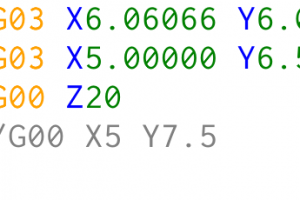
You can use loop o-words with PlanetCNC TNG. Sometimes you need to execute line(s) of g-code in a loop while evaluating specific condition. When condition evaluates to false, program will exit loop. This comes useful for e.g. repetitive motion sequences, parameter manipulation etc… O-word loop commands consist of: O-do – Begin loop block O-while – End loop […]
You can use o-word conditional statements with PlanetCNC TNG. O-word conditional statement consist of if, elseif, else and endif keywords. All keywords of the same conditional statement should use same o-word number. Example of if…endif conditional statement: % #1=10 o100 if [#1 EQ 10] (PRINT,Condition is true) o100 endif % Parameter #1 is assigned value 10. o100 if […]
Some CNC jobs demand repetition of the same motion over and over again, e.g.: drilling of a 100 holes. If we want to re-use the existing g-code pattern throughout the main program, we can use subroutines. Subroutine is basically a program block which is executed the moment it gets called from main program. Subroutine program can […]
If you want to save your variable and parameter values or any other log data in a form of a file, you can use LOG command. LOG: Writes to LOG file LOGCREATE: Creates new LOG file. LOGOPEN: Adds content to previously created LOG file LOGCLOSE: Closes LOG file Example 1: G-code program will create LOG file […]
With PlanetCNC TNG it is possible to control g-code program flow. For this purpose you can use o-word g-codes. o-words are formed as blocks and can be, based on their functionality, categorized into 4 groups: SUBROUTINE (subroutine block) CONDITION (if..endif,elseif,else…block) LOOP (do…while, ehile..endwhile loop block) REPEAT (repeat…endrepeat block) During this multipart tutorial series we will […]
In machining it is sometimes necessary to stop the motion of all axes for a given amount of time (for example to let the spindle come up to speed or wait for the coolant to start flowing). This is called dwell. It’s activated with the G04 command. The time is specified using a P-word and […]


